Show them what's happening in their swing.
Video analysis that lives with your lesson notes, not in another app. Use it in the bay, or on the clips players send you from the range.
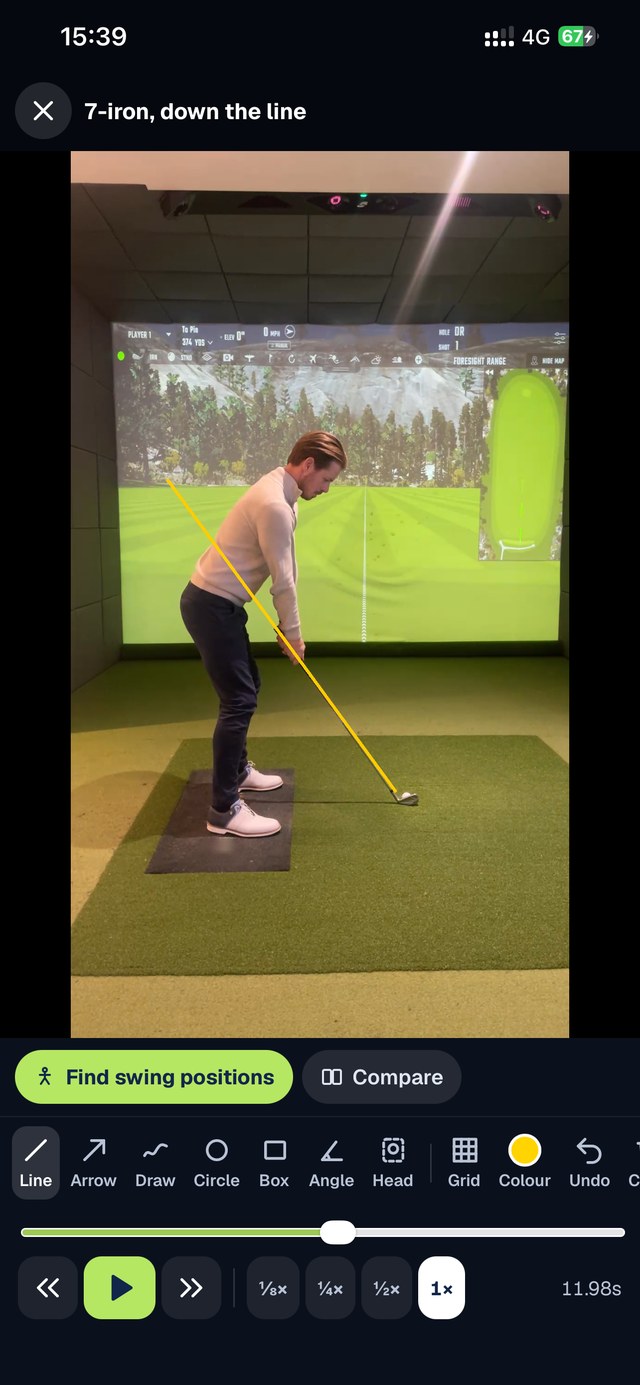
The tools, all in one place.
Film a swing in the lesson, or open one a player sends you. Coachd finds address, the top, impact and the finish for you, then gives you the tools to show them what's happening.
Built for how you actually coach.
Key positions, found for you
Coachd finds address, the top, impact and the finish, and draws the skeleton on with the angles that matter, like the lead arm at the top and the trail knee.
Replay mode
Prop your phone up behind the bay. Every swing plays back on screen a few seconds after it happens, at half speed, so your player sees it before the next ball. Save the ones worth keeping.
Swings players send you
Players film a swing or a drill and send it with a question. It lands in your inbox, you analyse it with the same tools and reply, and your reply shows under their video.
The swing check
Coachd looks at the four positions, the measurements and what you've been working on in their lessons, then writes a short check in your voice. It only goes to the player if you share it.
Compare two swings
Side by side or overlaid: last month against today, or their swing against the drill. The clearest way to show progress.
Draw on it
Lines, angles and a head box, frame by frame, down to an eighth of the speed. Clips are saved with their lessons, so the video and the fix stay together.